Seabird: Native Kubernetes Desktop IDE for Seamless Cluster Exploration
This repository profile is provided by osrepos.com, an open source repository discovery platform.
Summary
Seabird is a native Kubernetes desktop IDE designed for the GNOME environment, offering an intuitive interface for cluster exploration and management. It provides essential features like a terminal for command execution, monitoring through logs and metrics, and a resource editor with convenient API reference access.
Repository Information
Topics
Click on any tag to explore related repositories
Use at your own risk
OSRepos shares public repositories for knowledge and discovery only. Any installation, execution, configuration, or use of code from these repositories is the user's own responsibility. Always review the repository, source code, dependencies, licenses, and security implications before running or installing anything. OSRepos is not responsible for issues, damages, or losses resulting from third-party repositories.
Introduction
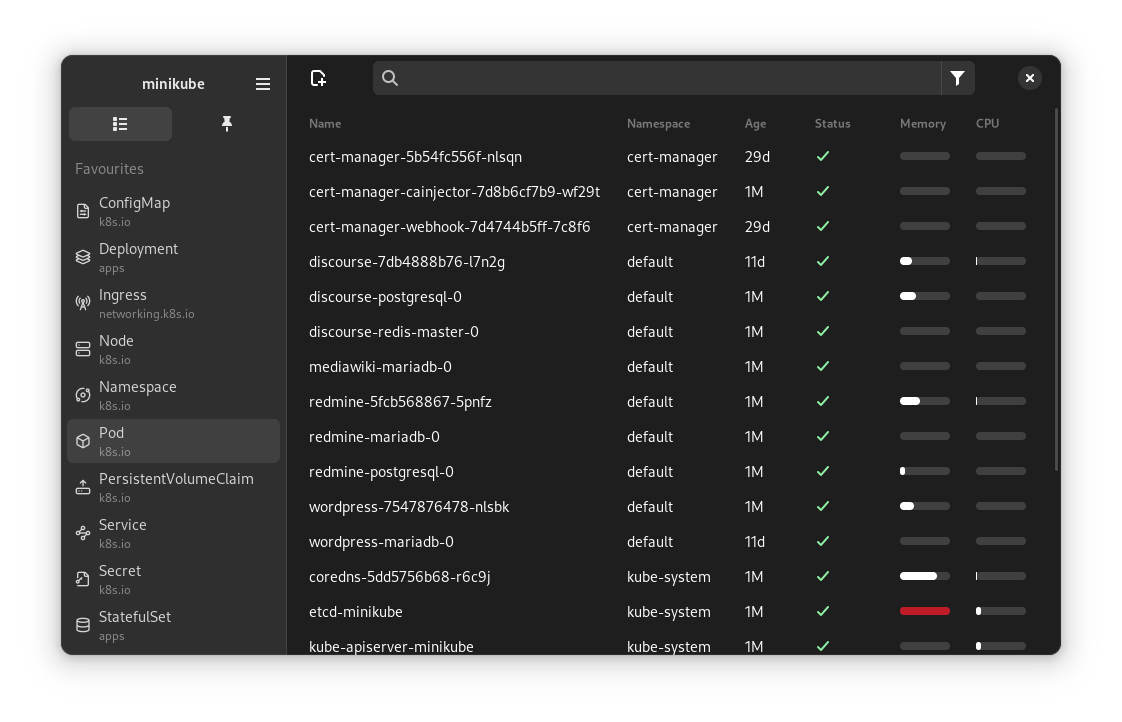
Seabird is a powerful Kubernetes IDE tailored for the GNOME desktop, providing a seamless experience for exploring and managing your clusters. It offers a simple and intuitive interface, making complex Kubernetes operations more accessible. Key features include an integrated terminal for executing commands, comprehensive monitoring capabilities for logs and metrics, and a resource editor that places the Kubernetes API reference at your fingertips.
Installation
For easy access, downloads for all supported platforms are available under the official releases page. On Linux, the recommended method is to use the Flatpak package:
Alternatively, you can build Seabird from source. First, ensure you have the necessary build dependencies for your operating system:
Fedora
sudo dnf install gtk4-devel gtksourceview5-devel libadwaita-devel gobject-introspection-devel glib2-devel vte291-gtk4-devel golang
Debian
sudo apt install libgtk-4-dev libgtksourceview-5-dev libadwaita-1-dev libgirepository1.0-dev libglib2.0-dev-bin libvte-2.91-gtk4-dev golang-go
After installing dependencies, run go generate to create the embedded resource file:
go generate ./...
Then, build the application with:
go build
Usage and Features
Seabird simplifies Kubernetes cluster management through its integrated tools. Users can interact with their clusters directly using the built-in terminal, executing kubectl commands without leaving the IDE. The monitoring features allow for real-time observation of logs and metrics, providing crucial insights into application performance and health. Additionally, the resource editor offers a convenient way to modify Kubernetes resources, complete with an integrated API reference to guide you through configurations.
Why Use Seabird?
Seabird stands out as a dedicated Kubernetes IDE for desktop users, particularly those on GNOME. Its native integration and intuitive design streamline the often-complex tasks associated with Kubernetes. By consolidating essential tools like a terminal, monitoring dashboards, and a resource editor into a single application, Seabird enhances productivity and reduces the learning curve for managing containerized applications. It provides a comprehensive environment for developers and operators alike. Please note that Seabird is paid software, but it offers an unlimited free trial.
Links
- GitHub Repository: https://github.com/getseabird/seabird
- Releases: https://github.com/getseabird/seabird/releases
- Flatpak: https://flathub.org/apps/dev.skynomads.Seabird
- Report Issues: https://github.com/getseabird/seabird/issues
- Feature Suggestions: https://github.com/getseabird/seabird/discussions
Related repositories
Similar repositories that may be relevant next.
REAL Video Enhancer: AI-Powered Video Interpolation, Upscaling, and Denoising
June 19, 2026
REAL Video Enhancer is a powerful open-source application designed to enhance video quality across Linux, Windows, and macOS. It leverages AI models for advanced video processing tasks such as frame interpolation, upscaling, decompression, and denoising. This tool provides a modern alternative to older software, making high-quality video enhancement accessible to a wider audience.
QDirStat: Efficient Disk Space Analysis and Cleanup for Linux and macOS
March 11, 2026
QDirStat is a powerful, Qt-based graphical application designed to help you understand where your disk space has gone and efficiently clean it up. It is the modern, KDE-independent successor to the original KDirStat, developed by the same author. QDirStat provides an intuitive interface for visualizing disk usage, making it an essential tool for system maintenance on Linux, BSD, Unix-like systems, and macOS.

Fyne: A Cross-Platform GUI Toolkit in Go Inspired by Material Design
January 16, 2026
Fyne is an easy-to-use UI toolkit and application API written in Go, designed to build cross-platform applications. It allows developers to create desktop and mobile apps from a single codebase, drawing inspiration from Material Design principles. With Fyne, you can develop elegant and functional graphical user interfaces efficiently.
YTSage: A Modern YouTube Downloader with a Clean PySide6 GUI
December 31, 2025
YTSage is a modern, cross-platform YouTube downloader featuring a clean PySide6 interface. It allows users to download videos in various qualities, extract audio, fetch subtitles, and utilize advanced features like SponsorBlock integration. Built on yt-dlp, YTSage ensures reliable and efficient media downloads.
Source repository
Open the original repository on GitHub.
10 counted GitHub visits