mini-graph-card: Minimalistic Graph Card for Home Assistant Lovelace UI
This repository profile is provided by osrepos.com, an open source repository discovery platform.

Summary
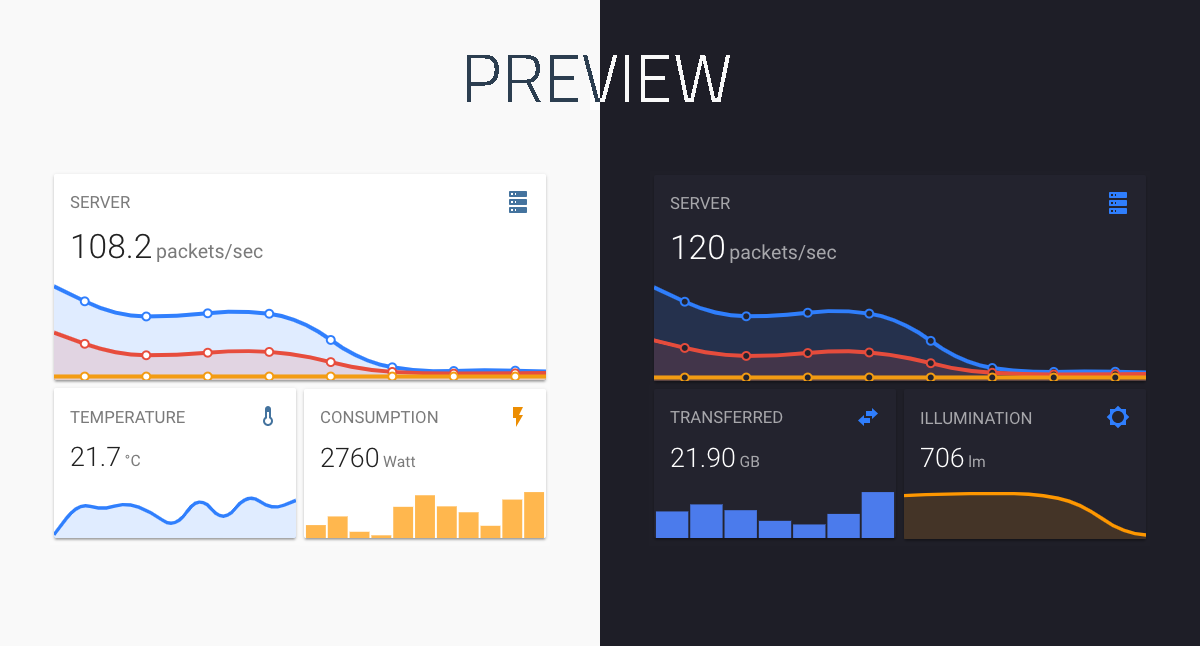
The mini-graph-card is a highly popular and versatile custom Lovelace UI card designed for Home Assistant, offering a minimalistic yet powerful way to visualize sensor data. It provides extensive customization options to display current states and historical data from various entities directly within your smart home dashboard. This project is ideal for users looking to enhance their Home Assistant interface with clear, informative, and aesthetically pleasing data representations.
Repository Information
Topics
Click on any tag to explore related repositories
Use at your own risk
OSRepos shares public repositories for knowledge and discovery only. Any installation, execution, configuration, or use of code from these repositories is the user's own responsibility. Always review the repository, source code, dependencies, licenses, and security implications before running or installing anything. OSRepos is not responsible for issues, damages, or losses resulting from third-party repositories.
Introduction
The mini-graph-card is a highly popular and versatile custom Lovelace UI card designed for Home Assistant. Developed by kalkih, this project offers a minimalistic yet powerful way to visualize sensor data directly within your smart home dashboard. With 3731 stars and 265 forks, it's a testament to its utility and community adoption. Written in JavaScript and distributed under the MIT license, it provides a flexible solution for displaying historical data from various entities.
Its core functionality revolves around presenting the current state of sensors alongside a clean line graph representation of their history. Whether you're tracking temperature, humidity, energy consumption, or binary sensor states, mini-graph-card offers extensive customization options to fit your aesthetic and data visualization needs.
Installation
Getting started with mini-graph-card is straightforward, with several installation methods available:
HACS (Recommended)
The easiest way to install is through the Home Assistant Community Store (HACS). Simply search for 'Mini Graph Card' and follow the prompts.

Manual Install
- Download and copy
mini-graph-card-bundle.jsfrom the latest release into yourconfig/wwwdirectory. - Add the resource reference as described below.
CLI Install
- Move into your
config/wwwdirectory. - Grab
mini-graph-card-bundle.js:
$ wget https://github.com/kalkih/mini-graph-card/releases/download/v0.13.0/mini-graph-card-bundle.js
- Add the resource reference as described below.
Add Resource Reference
If you configure Lovelace via YAML, add a reference to mini-graph-card-bundle.js inside your configuration.yaml:
resources:
  - url: /local/mini-graph-card-bundle.js?v=0.13.0
    type: module
Else, if you prefer the graphical editor, use the menu to add the resource:
- Make sure, advanced mode is enabled in your user profile (click on your user name to get there).
- Navigate to Configuration -> Lovelace Dashboards -> Resources Tab. Hit orange (+) icon.
- Enter URL
/local/mini-graph-card-bundle.jsand select type "JavaScript Module". (Use/hacsfiles/mini-graph-card/mini-graph-card-bundle.jsand select "JavaScript Module" for HACS install). - Restart Home Assistant.
Examples
The mini-graph-card offers a wide array of configuration options to visualize your data. Here are a few examples to get you started:
Single Entity Card
Display a simple graph for a single sensor.
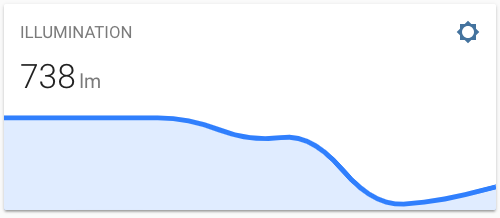
type: custom:mini-graph-card
entities:
 - sensor.illumination
Multiple Entities Card
Combine several related sensors into one graph for a comprehensive overview.
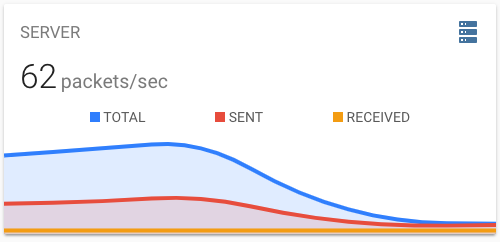
type: custom:mini-graph-card
name: SERVER
icon: mdi:server
entities:
  - entity: sensor.server_total
    name: TOTAL
  - sensor.server_sent
  - sensor.server_received
Bar Chart Card
Visualize data using a bar chart instead of a line graph, useful for aggregated values like daily consumption.
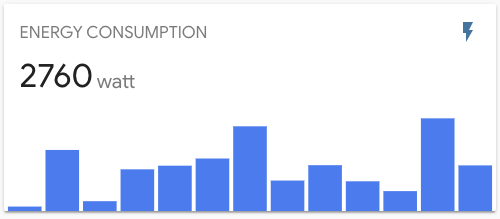
type: custom:mini-graph-card
entities:
  - entity: sensor.energy_consumption
name: ENERGY CONSUMPTION
show:
  graph: bar
Dynamic Line Color
Set thresholds to dynamically change the graph's line color based on sensor values.
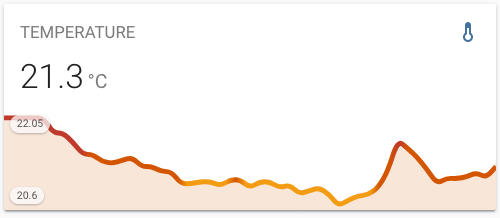
type: custom:mini-graph-card
entities:
  - sensor.sensor_temperature
show:
  labels: true
color_thresholds:
  - value: 20
    color: "#f39c12"
  - value: 21
    color: "#d35400"
  - value: 21.5
    color: "#c0392b"
Non-numeric Sensor States
Graph binary sensors or other non-numeric states by mapping their values to a numerical representation.
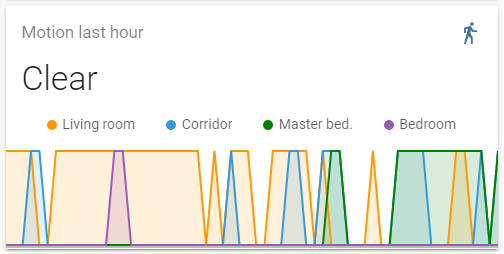
type: custom:mini-graph-card
entities:
  - entity: binary_sensor.living_room_motion
    name: Living room
  - entity: binary_sensor.corridor_motion
    name: Corridor
  - entity: binary_sensor.master_bed_motion
    name: Master bed.
    color: green
  - entity: binary_sensor.bedroom_motion
    name: Bedroom
name: Motion last hour
hours_to_show: 1
points_per_hour: 60
update_interval: 30
aggregate_func: max
line_width: 2
smoothing: false
state_map:
  - value: "off"
    label: Clear
  - value: "on"
    label: Detected
Why Use mini-graph-card?
The mini-graph-card stands out for its exceptional flexibility and aesthetic appeal in Home Assistant dashboards. Its minimalistic design ensures that your UI remains clean and uncluttered, while offering deep customization options to tailor graphs precisely to your needs. From dynamic color thresholds and multiple entity support to advanced data aggregation and handling non-numeric states, it provides powerful visualization capabilities. It's an essential tool for anyone looking to enhance their Home Assistant Lovelace interface with clear, informative, and beautiful data representations.
Links
Explore the mini-graph-card repository on GitHub for more details, advanced configurations, and to contribute to the project:
Related repositories
Similar repositories that may be relevant next.
dcc-mcp-blender: AI-Driven 3D Workflows with an Embedded MCP Server
September 24, 2026
dcc-mcp-blender is a powerful Blender addon that integrates an embedded Streamable HTTP MCP server directly into Blender. This allows any MCP-compatible AI client to seamlessly control and automate your 3D modeling, animation, and rendering workflows. It offers over 200 pre-built tools and an extensible skill system for robust production environments.
Goon: Autonomous AI Worker for Software Development and Custom Workflows
September 15, 2026
Goon is a self-hosted, autonomous AI worker designed to streamline software development and automate custom workflows. Built with Go and having zero dependencies, it operates as a daemon, capable of tasks from writing code and opening PRs to summarizing emails and monitoring logs. It learns from your context and asks for human approval before acting, ensuring controlled and intelligent automation.
aidevops: Autonomous AI DevOps Framework for 100x Developer Productivity
September 9, 2026
aidevops is an AI DevOps framework and OpenCode plugin designed to automate complex development, business, and creative projects. It enables AI agents to perform useful work across various domains, providing structure, security, and token efficiency for autonomous project delivery. This platform aims to significantly enhance developer capabilities by managing projects end-to-end without constant human supervision.
Ferry: Jira-Driven Autonomous Development on GitHub Actions
September 7, 2026
Ferry is an innovative GitHub Actions-native agent pipeline designed to automate your development workflow. It seamlessly integrates with Jira, transforming column moves into reviewed draft pull requests without requiring any server or daemon. This tool empowers teams to achieve a fully autonomous development loop, from ticket refinement to merged PRs.
Source repository
Open the original repository on GitHub.
17 counted GitHub visits